

PSG grant accounting software for Singapore SMEs
Singapore SMEs can use the Productivity Solutions Grant (PSG) to fund pre-approved accounting software, covering up to 50% of qualifying costs, subject to an annual cap of S$30,000 per company. The most practical first step is to search the PSG Solutions Directory on GoBusiness, confirm the solution and vendor are listed, then obtain a compliant vendor quotation before applying on the Business Grants Portal (BGP).
Common PSG-eligible accounting software solutions to search for in the directory include:
- Xero — cloud accounting for micro to small businesses, with GST reporting and bank feeds
- QuickBooks Online — suitable for small businesses needing straightforward bookkeeping and reporting
- A2000ERP — a local ERP with accounting modules, suited to inventory-heavy or multi-entity SMEs
- Info-Tech Cloud Accounting — a locally developed cloud solution with IRAS GST compliance built in
- Abundant Accounting Pte Ltd — a pre-approved vendor offering implementation and ongoing support packages
Search each name in the GoBusiness PSG solutions list to confirm current listing status, then contact the vendor for a quotation that matches the approved package annex before submitting your application.
Key takeaways
| Point | Details |
|---|---|
| Verify pre-approval first | Confirm the solution and vendor appear in the current GoBusiness PSG Solutions Directory before engaging. |
| Apply before paying | No payment to the vendor is permitted before the Letter of Offer is received and accepted on the BGP. |
| Match the annex exactly | The vendor quotation must reference the PSG package code and match annex line items to avoid rejection. |
| Deploy, then claim | Usage evidence and deployment confirmation are required; collect dated screenshots throughout the minimum period. |
| Bizsquare for end-to-end support | Bizsquare handles eligibility checks, quotation validation, application preparation, and claim submission for SMEs. |
What does PSG cover for accounting software?
The PSG is administered by EnterpriseSG and supports Singapore-registered businesses in adopting productivity-enhancing technology. To qualify, a business must meet all of the following conditions:
- Registered and operating in Singapore
- At least 30% local shareholding
- Annual turnover of no more than S$100 million, or no more than 200 employees
- The solution must be used in Singapore
- The purchase must follow the approved package exactly as listed in the PSG annex
PSG funding level: EnterpriseSG supports up to 50% of qualifying costs for pre-approved solutions, with an annual cap of S$30,000 per company for EnterpriseSG-supported solutions.
Two payment rules are non-negotiable. First, applicants must not make any payment to the vendor before receiving the Letter of Offer. Second, the full invoice amount must be paid before submitting a claim, and proof of full payment must accompany the claim documents. The GoBusiness PSG guidance confirms that only purchases made after the official approval date qualify for reimbursement.
How do you confirm a solution is PSG-approved?
The definitive source is the PSG Solutions Directory on GoBusiness. Follow these steps to verify a solution before committing to a vendor:
- Go to the PSG Solutions Directory and select the “Accounting” or “Finance” category.
- Search by solution name or vendor name to locate the listing.
- Open the solution entry and review the package annex, which lists the exact items covered and their costs.
- Confirm the vendor name on the listing matches the vendor you intend to engage.
- Request a quotation from that vendor and verify it references the correct package code and annex items.
IMDA runs the pre-approval process for solutions under the SMEs Go Digital programme, and its vendor pre-approval guidance explains how vendors qualify to appear in PSG listings. A vendor that does not appear in the directory, or whose quotation references items not in the annex, is a red flag.
Pro Tip: PSG listings are updated periodically. Always check the directory on the day you request a quotation, not weeks earlier, because a solution can be removed or its annex revised between your initial research and your application date.
When requesting a quotation, ask the vendor to provide:
- Itemised costs that match the PSG annex line by line
- The PSG package code or solution reference number
- The vendor’s UEN and contact details
- Confirmation of the implementation timeline and minimum deployment period
Accounting firms that hold pre-approved vendor status can prepare quotations that already meet these requirements, which reduces back-and-forth before submission.
Which PSG-eligible accounting software suits your business?
The five solutions that commonly appear in the GoBusiness directory for accounting cover a range of business profiles. Here is a compact shortlist with guidance on fit.
| Solution | PSG pre-approved | Best for | Key features | Local support | Ease of PSG documentation |
|---|---|---|---|---|---|
| Xero | Yes (vendor page listed) | Micro to small businesses, service firms | GST reporting, bank feeds, e-invoicing, payroll add-ons | Multiple local partners | High, vendor provides PSG-specific guidance |
| QuickBooks Online | Yes (check directory for current listing) | Small businesses, freelancers, simple books | GST filing, bank reconciliation, basic reporting | Local resellers available | Moderate, quotation must match annex |
| A2000ERP | Yes (local ERP vendor) | Inventory-heavy SMEs, multi-entity groups | Inventory, GST, payroll, multi-currency, reporting | Direct local vendor support | High, local vendor familiar with PSG process |
| Info-Tech Cloud Accounting | Yes (locally developed) | SMEs needing IRAS-compliant GST and local support | IRAS GST, InvoiceNow readiness, bank reconciliation | Local vendor, direct support | High, vendor experienced with PSG claims |
| Abundant Accounting Pte Ltd | Yes (pre-approved vendor) | SMEs wanting bundled software and implementation | Implementation, training, ongoing support packages | Direct, Singapore-based | High, full-service vendor handles documentation |
Quick recommendations:
- Xero suits a small service business that wants cloud access, strong bank feed integration, and a wide choice of add-ons. The Xero PSG vendor page provides package details and annex guidance directly.
- QuickBooks Online fits a business already familiar with the interface or one that needs straightforward profit-and-loss reporting without complex inventory.
- A2000ERP is the stronger choice for a retailer or distributor managing stock across locations, given its inventory and multi-entity modules.
- Info-Tech Cloud Accounting appeals to SMEs that prioritise local technical support and need a solution built around IRAS GST requirements from the ground up.
- Abundant Accounting Pte Ltd works well for an SME that wants a single vendor to handle both the software and the implementation, reducing the coordination burden.
PSG-listed vendors commonly promote features such as IRAS GST support, InvoiceNow readiness, and bank reconciliation as standard, as illustrated by local accounting software vendor pages in the Singapore market.
How do you choose the right PSG accounting software?
Start with your core business need, not the grant amount. A solution that fits your operations and produces clean financial data will deliver more value than one chosen purely because it has the highest PSG support rate.
Ask every shortlisted vendor these questions before accepting a quotation:
- Does the solution support IRAS GST F5/F7 return preparation and submission?
- Is the solution InvoiceNow-ready for e-invoicing compliance?
- Does it include automated bank feeds for your Singapore bank accounts?
- Can it handle payroll, or does it integrate with a payroll module?
- What customised reports does it produce, and can they be exported for audit purposes?
- What is the minimum deployment period required before a PSG claim can be submitted?
Red flags to watch for in vendor quotations and contracts:
- Quotation items that do not match the PSG annex line by line
- Vague descriptions such as “implementation services” with no itemised breakdown
- Support terms that expire before the minimum deployment period ends
- A vendor who cannot provide the PSG package code or solution reference number
- Pricing that differs from the amount on the PSG directory listing
Decision checklist before signing:
- [ ] Solution appears in the current GoBusiness PSG directory listing
- [ ] Quotation matches annex items and package code
- [ ] Vendor can confirm implementation timeline fits your operational calendar
- [ ] Total cost after PSG support is within budget
- [ ] Local support is available for training and troubleshooting post-deployment
- [ ] Vendor can supply usage screenshots and deployment confirmation for the claim
Keeping good accounting records throughout implementation also strengthens the claim submission, because EnterpriseSG expects evidence of active use, not just a paid invoice.
Step-by-step PSG application and claims process
The Business Grants Portal is where every application and claim is submitted. CorpPass authorisation is required for all transactions. Here is the full workflow in order.
Application steps
- Identify the solution. Confirm it is listed in the PSG Solutions Directory.
- Obtain a vendor quotation. The quotation must match the approved package annex exactly.
- Log in to the Business Grants Portal using CorpPass. If CorpPass is not yet set up, follow the CorpPass user guides to register and link your UEN.
- Submit the application on BGP, attaching the vendor quotation and business details.
- Wait for the Letter of Offer. Do not make any payment to the vendor before this letter arrives.
- Accept the Letter of Offer on BGP within the stipulated deadline.
- Purchase the solution and pay the vendor in full.
- Deploy the solution and use it for the minimum required period.
- Submit the claim on BGP with all required documents.
Documents required for the claim
- Vendor invoice addressed to your company name (not a personal name)
- Proof of full payment showing both payer and payee details, such as a bank transfer record
- Deployment confirmation from the vendor, such as a go-live letter or activation record
- Usage evidence, such as screenshots of the software in active use
- Licence numbers or serial numbers where the solution requires them
A practical accounting checklist can help you track which documents to collect at each stage.
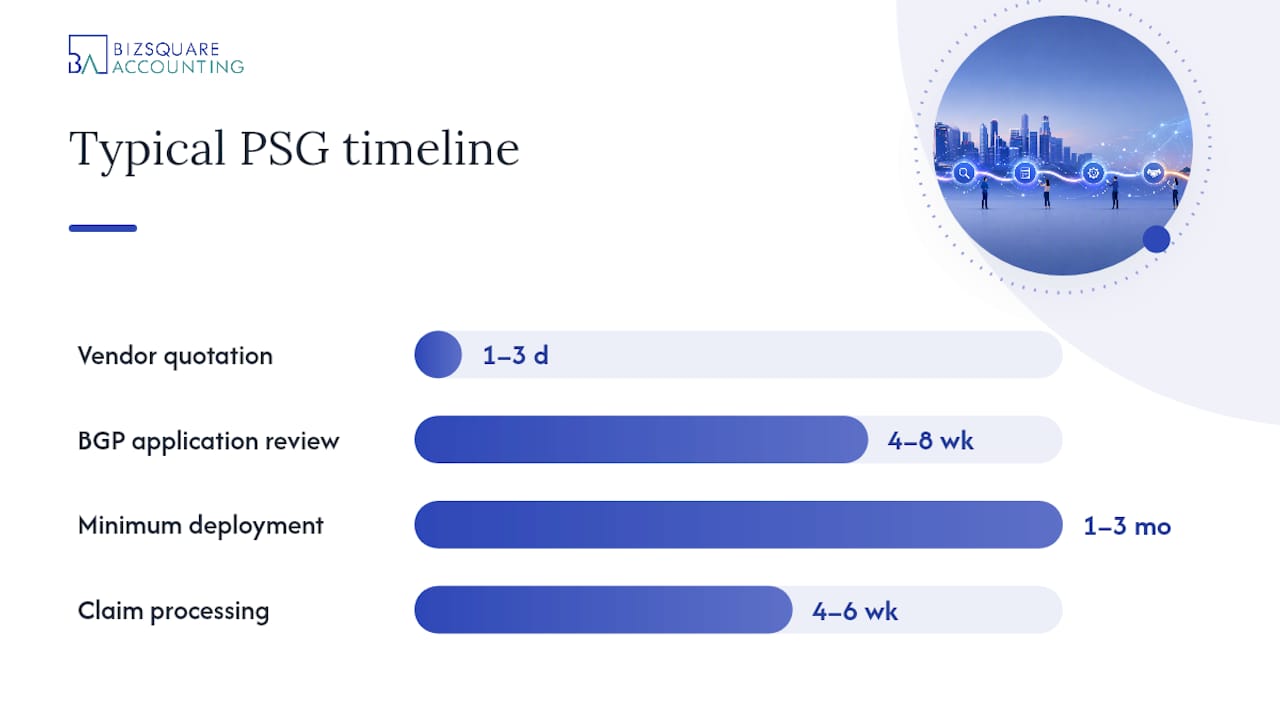
Typical timeline per step
| Stage | Typical duration |
|---|---|
| Vendor quotation preparation | 1–3 business days |
| BGP application review | 4–8 weeks |
| Letter of Offer issuance | Within the review period above |
| Minimum deployment period before claim | As specified in the Letter of Offer (commonly 1–3 months) |
| Claim processing after submission | 4–6 weeks |
Practical tip for disbursement: Link your company UEN to a PayNow Corporate or GIRO account before submitting the claim. EnterpriseSG disburses grant payments electronically, and an unlinked account delays payment after an approved claim.
Common reasons PSG applications are rejected
The most frequent causes of rejection are payment made before application, quotations that do not match the PSG annex, missing supporting documents, and insufficient proof of usage. Each is avoidable with preparation.
- Payment before application: Any invoice paid before the Letter of Offer date disqualifies the claim entirely. Confirm the application is approved before authorising any payment to the vendor.
- Quotation mismatch: The vendor quotation must reference the exact package code and annex items from the PSG directory listing. A quotation that bundles non-PSG items or uses different line descriptions will be queried or rejected.
- Missing or incorrect invoice details: The invoice must be addressed to the applicant company’s registered name. An invoice made out to a personal name or a trading name that differs from the UEN registration is a common error.
- Incomplete proof of payment: A partial payment record or a payment receipt that does not show both payer and payee details will not satisfy the claim requirement. Submit a full bank statement extract or remittance advice.
- Insufficient usage evidence: Screenshots must show the software in active use with identifiable company data, not just a login screen. Dated screenshots taken at regular intervals during the deployment period are the safest approach.
- Expired or revised PSG listing: If the solution’s PSG listing is revised after the quotation is issued but before the claim is submitted, the claim may not align with the current annex. Reconfirm the listing status before submitting.
Pro Tip: Working with an accounting firm or pre-approved implementation partner to prepare documentation reduces errors significantly. These partners understand the PSG annex structure and can produce usage reports that meet EnterpriseSG’s evidence standards.
The EnterpriseSG PSG FAQ provides clarifications on qualifying costs and deployment requirements that are worth reviewing before submission.
How Bizsquare helps SMEs apply for PSG and implement accounting software
Bizsquare provides end-to-end support across the PSG journey, from initial vendor shortlisting through to claim submission and post-implementation reporting. For SMEs that find the documentation requirements time-consuming, this kind of structured support reduces the risk of rejection and speeds up disbursement.
The specific services Bizsquare offers in this context include:
- PSG eligibility check: Confirming that the business meets EnterpriseSG’s shareholding, turnover, and employee criteria before any time is spent on vendor selection.
- Quotation validation: Reviewing the vendor quotation against the PSG annex to confirm every line item matches before the application is submitted.
- Application documentation: Preparing and organising all required documents for the BGP submission, including the vendor quotation, company details, and supporting evidence.
- CorpPass guidance: Assisting directors and authorised users in setting up CorpPass access and linking the company UEN to the BGP account.
- Deployment and training support: Coordinating with the vendor on implementation timelines and ensuring staff are trained to use the software actively during the minimum deployment period.
- Claim submission support: Compiling usage screenshots, deployment confirmations, invoices, and payment records into a submission-ready claim package.
- Disbursement setup: Verifying that PayNow Corporate or GIRO is correctly linked to the company UEN so that approved funds are received without delay.
Bizsquare’s accounting and bookkeeping expertise also means that post-PSG compliance, such as maintaining accurate GST records and producing financial reports, is handled as part of the ongoing engagement. This is particularly relevant for SMEs that are new to cloud accounting and need guidance beyond the initial setup. For a broader view of top SME grant options in Singapore, Bizsquare’s advisory team can advise on which programmes align with the business’s current stage and growth plans.
PSG-funded accounting software: an editorial perspective
The PSG is one of the more straightforward productivity grants available to Singapore SMEs, and the accounting software category is well-served by it. The real value, however, is not in the subsidy itself. It lies in what a business does with the software after the grant is disbursed.

Many SMEs treat the PSG application as the finish line. They secure the funding, install the software, and then revert to the same manual processes the software was meant to replace. The grant’s productivity case is only realised when the software is actually used, and used well. That means trained staff, consistent data entry, and regular financial reporting. Documentation for the claim is, in a sense, a proxy for this: if a business can produce dated usage screenshots and a deployment confirmation, it has at least started using the tool.
The documentation burden also reveals something useful about vendor quality. A vendor who cannot help an SME produce a compliant quotation or a clear usage report is unlikely to provide strong post-implementation support either. Choosing a pre-approved vendor with a track record of PSG claims is therefore a signal of operational competence, not just administrative convenience.
Check the GoBusiness listing, confirm the vendor’s PSG annex, and contact Bizsquare for tailored support if the documentation process feels uncertain.
Bizsquare’s PSG application and accounting support services
Securing PSG funding for accounting software involves more than selecting a solution from a directory. The documentation requirements, CorpPass setup, annex matching, and claim submission each carry the potential for costly errors if handled without experience.
Bizsquare offers a fixed-scope PSG support service that covers eligibility verification, quotation validation, application preparation, and claim submission. For SMEs that also need ongoing bookkeeping after implementation, Bizsquare’s accounting and compliance services provide continuity from grant application through to monthly financial reporting and GST filing. The team can verify that vendor quotations are submission-ready and that all claim documents meet EnterpriseSG’s requirements before anything is filed on the BGP.
To get started, visit Bizsquare’s accounting services page or contact the team directly for a PSG eligibility check and quotation review.
Sources
These are the primary official pages to use during the PSG application process.
- Productivity Solutions Grant (PSG)
- PSG Solutions Directory
- Business Grants Portal
- IMDA pre-approval of ICM vendors and solutions
FAQ
1.) Can a business pay the vendor before the PSG application is approved?
No. EnterpriseSG requires that no payment is made before the Letter of Offer is issued and accepted. Any payment made before approval disqualifies the claim entirely.
2.) How do you find PSG-approved accounting software in Singapore?
Search the GoBusiness PSG Solutions Directory by category or vendor name. Confirm the solution’s package annex and vendor details are current before requesting a quotation.
3.) What documents are needed to submit a PSG claim?
The claim requires a vendor invoice addressed to the company name, proof of full payment showing payer and payee details, deployment confirmation, and usage screenshots taken during the minimum deployment period.
4.) Does the accounting software need to be used for a minimum period before claiming?
Yes. The Letter of Offer specifies a minimum deployment period, commonly one to three months, during which the software must be actively used. Usage evidence must be submitted with the claim.
5.) Can an accounting firm help with the PSG application process?
Yes. Accounting firms and pre-approved implementation partners can assist with quotation validation, application documentation, CorpPass setup, and claim submission. Bizsquare offers this service for Singapore SMEs.
6.) What happens if the vendor quotation does not match the PSG annex?
The application or claim may be queried or rejected. The quotation must reference the exact PSG package code and match every annex line item. Request a revised quotation from the vendor before submitting.
7.) Is QuickBooks Online still PSG-eligible in Singapore?
QuickBooks Online has appeared in PSG listings for Singapore SMEs, but listings change. Always verify current status in the GoBusiness PSG Solutions Directory on the day you request a quotation.
8.) What is the typical timeline from application to disbursement?
BGP application review typically takes four to eight weeks. After approval, the minimum deployment period must pass before a claim is submitted. Claim processing then takes approximately four to six weeks. Total time from application to disbursement commonly ranges from three to six months.
9.) Does Bizsquare provide PSG application support for accounting software?
Yes. Bizsquare offers eligibility checks, quotation validation, application preparation, CorpPass guidance, and claim submission support for SMEs applying for PSG-funded accounting software in Singapore.
Recommended